 Statement Press
Year-end giving statement template
A year-end giving statement is a one-page letter that lists every gift a donor made during the year, shows the total, and says whether they received anything in return. Here is a sample to download, text you can copy, and a way to fill it in for every donor at once.
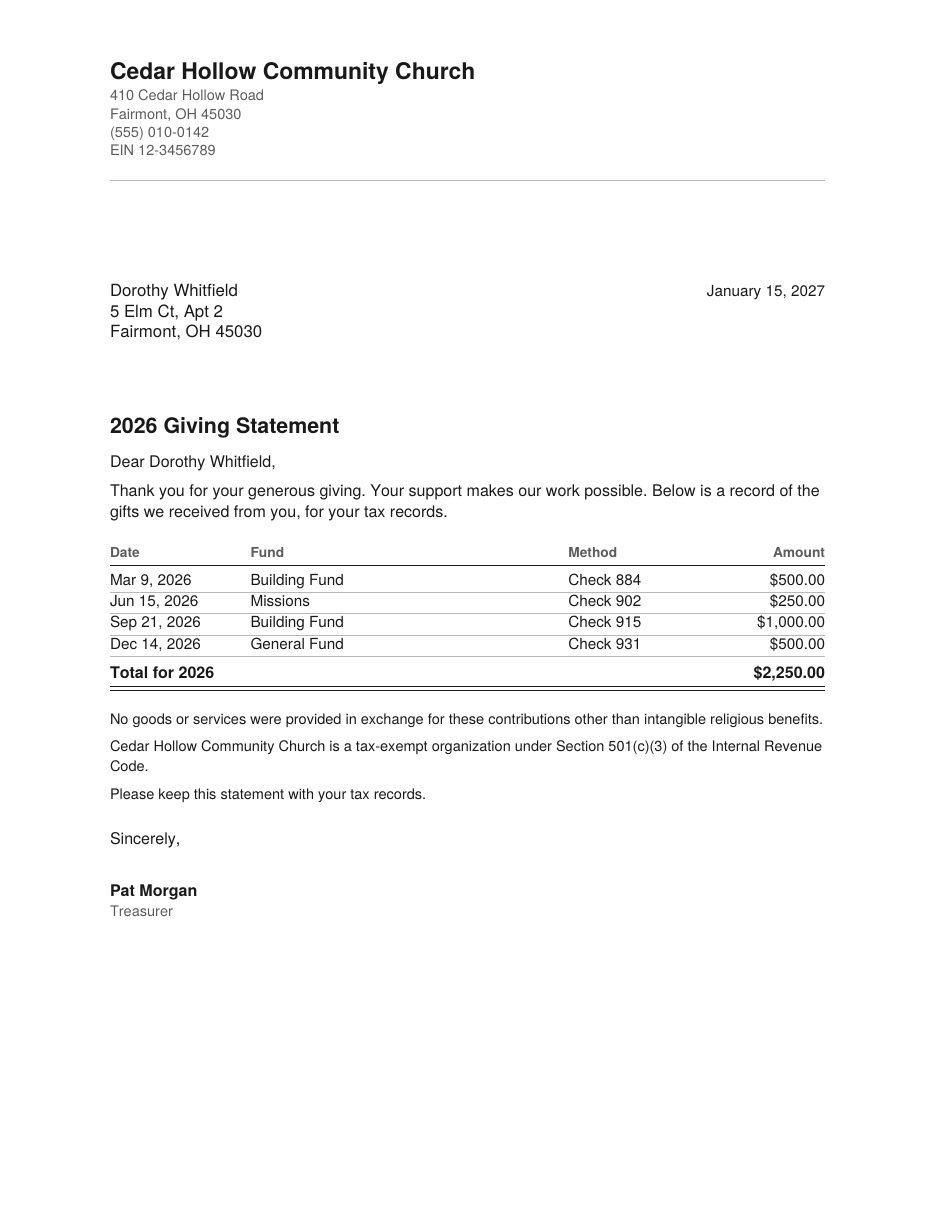
What goes on a giving statement
- Your letterhead. The organization's name and address. An EIN is optional, though donors and tax preparers like to see it.
- The date you issued the statement.
- The donor's name and mailing address.
- A title with the tax year, such as “2026 Giving Statement”.
- A short thank-you.
- Every gift, with its date and amount. The fund and the check number or payment method are optional but helpful.
- The total for the year.
- The goods-or-services sentence. This is the one line the IRS insists on for gifts of $250 or more.
- A line saying you are a 501(c)(3) organization, if you are.
- A signature. A name and title is enough.
The IRS does not prescribe a layout. Its guidance says letters, postcards and computer-generated forms are all acceptable, and a statement can be mailed or emailed. What matters is that the required information is there. Our guide to the rules has the details.
Template text you can copy
Paste this into Word or Google Docs and replace everything in square brackets.
[Organization name]
[Street address]
[City, State ZIP]
EIN [00-0000000]

[Date]

[Donor name]
[Donor street address]
[Donor city, State ZIP]

[Year] Giving Statement

Dear [Donor name],

Thank you for your generous giving. Your support makes our work possible. Below is a record of the gifts we received from you in [year], for your tax records.

Date            Fund              Method          Amount
[Month D, YYYY] [Fund]            [Check 0000]    [$0.00]
[Month D, YYYY] [Fund]            [Online]        [$0.00]

Total for [year]                                  [$0.00]

No goods or services were provided in exchange for these contributions.
[Organization name] is a tax-exempt organization under Section 501(c)(3) of the Internal Revenue Code.
Please keep this statement with your tax records.

Sincerely,

[Name]
[Title]
The goods-or-services sentence
Use the one that is true for your organization.
- Nothing was given in return. “No goods or services were provided in exchange for these contributions.”
- Churches and other religious organizations. “No goods or services were provided in exchange for these contributions other than intangible religious benefits.”
- Something was given in return, such as a dinner, a book or an auction item. Describe it and give a good-faith estimate of its value. For example: “In exchange for your gift of $200 on May 3, you received a dinner with an estimated value of $45.”
Why mail merge makes this harder than it looks
Most people start with Word's mail merge and a spreadsheet of gifts. The catch is that mail merge makes one letter for each row of the spreadsheet. Giving records have one row for each gift, so a donor who gave twelve times gets twelve letters.
To get one letter per donor, you first have to build a second sheet that adds up each donor's gifts. Even then the letter can show only the total, because the list of individual gifts won't fit into a merge.
Statement Press does the grouping for you. Paste the rows as they are and it builds one statement per donor, with every gift listed and the total at the bottom.
Fill in the template for every donor at once
Free for up to 5 statements per file. No account, and nothing is uploaded.
Common questions
When should statements go out?
Aim for January 31. The legal deadline is later: a donor must have the acknowledgment by the day they file their tax return, or by the return's due date including extensions, whichever comes first. Donors who file early will want it in hand by the start of February.
Does every donor need one, or only those who gave $250 or more?
The written acknowledgment is required for any single gift of $250 or more. For smaller gifts of money, a donor needs either a bank record or something in writing from you that shows your name, the date and the amount. A statement that lists every gift covers both, which is why most organizations send one to every donor.
Can I email it?
Yes. The IRS accepts an acknowledgment sent by email.
Does the donor's Social Security number go on it?
No. The IRS says it is not necessary, and leaving it off is safer for everyone.
Sources
- IRS Publication 1771, Charitable Contributions: Substantiation and Disclosure Requirements
- IRS: Charitable contributions, written acknowledgments
- IRS Topic no. 506, Charitable contributions
This page is general information, not tax or legal advice. Ask your accountant if you are unsure what your organization should say.